Color Time: The Playful Outline Font That Invites Creativity
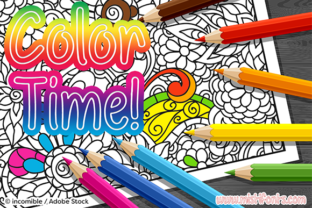
Typography can sometimes feel like a rigid, no-nonsense discipline. You pick a font, set the size, adjust the kerning, and move on. But what if a typeface itself encouraged you to stop, pick up a digital brush or a physical crayon, and fill it with color? That is exactly the invitation Color Time extends. This fun outline font turns text into a coloring book page, letting you customize every letter with hues, gradients, and patterns limited only by your imagination.
What Makes Color Time Stand Out
At its core, Color Time is a display font built around thick, clean outlines. Each character is designed with generous interior space, like a stencil ready to be filled. The lines are bold enough to contain any color you throw at them but thin enough to feel delicate and charming. The overall aesthetic leans playful, friendly, and slightly whimsical. It evokes childhood art projects, classroom decorations, and handmade signage, but it also carries a polished quality that suits digital design work.
What sets Color Time apart from standard outline fonts is the explicit intention behind its construction. Many outline typefaces exist, but they often leave the interior area too narrow for practical coloring, or their lines are uneven and hard to work with. Color Time solves that. The spacing inside each letterform is roomy, the curves are smooth, and the junctions where strokes meet are clean. This makes it equally satisfying to color manually with markers or pencils and to fill digitally using software layers and clipping masks.
An Open Canvas in Every Letter
Every glyph in Color Time functions like a miniature canvas. The uppercase letters, lowercase letters, numbers, and basic punctuation all share the same open, inviting structure. This consistency means you can plan complex coloring projects across entire words or phrases without worrying that one character will feel cramped compared to another. The uniform stroke weight also helps maintain visual harmony when you mix uppercase and lowercase in the same design.
For designers and hobbyists alike, this transforms text from a vessel for meaning into a visual element that demands attention. Instead of simply reading the word "rainbow," you can fill each letter of Color Time with a different color from the spectrum. Instead of telling someone to "think spring," you can decorate the letters with floral patterns or pastel washes. The font does the structural work; you supply the personality.
Where Color Time Fits Into Modern Workflows
You might assume a coloring font belongs exclusively in children's projects or classroom worksheets, but Color Time has found a home in several professional and creative contexts. Its versatility might surprise you.
Digital Art and Social Media Graphics
Social media feeds are crowded with polished, templated designs. A post using Color Time immediately reads as handcrafted and approachable. Content creators, especially in lifestyle, education, and craft niches, use this font to create quote graphics, announcement cards, and tutorial headers that feel personal. Because you can color the letters differently each time, no two posts need to look the same. A single font file can generate an endless variety of branded or thematic content.
Working in tools like Procreate, Photoshop, or Illustrator is straightforward. You type your text in Color Time, rasterize or convert to outlines, and then use layers beneath the stroke to add color, gradient fills, or even photographic textures. The thick black outline remains on top, framing your work and giving it a cohesive, finished look. Many digital artists also export the font as a base and print it for hand-coloring, photographing the result for a hybrid analog-digital aesthetic.
Classroom and Educational Materials
Teachers and homeschooling parents gravitate toward Color Time for its engagement factor. Worksheets, reward charts, name tags, and bulletin board headings become interactive when they incorporate this font. A child can practice spelling by tracing or coloring inside the letters. A teacher can create customizable worksheets where students fill vocabulary words with colors corresponding to a code. The font makes learning visible and tactile, even on a screen.
Because Color Time is an outline font, it also works well with handwriting practice. The thick outer lines provide a clear boundary, helping younger children understand letter shapes while giving them a satisfying coloring task. Older students can use it for book covers, science fair posters, or creative writing projects where visual presentation matters.
Event Planning and DIY Signage
Weddings, birthday parties, baby showers, and seasonal gatherings often call for handmade signs. Color Time lends itself beautifully to this. Event planners and DIY hosts print the font on cardstock, color the letters with markers or watercolors, and cut them out for banners, welcome signs, and table numbers. The outline style matches well with bunting, washi tape, and other craft supplies. Since the font is clean but not overly formal, it fits both rustic and modern party themes.
For digital invitations, you can color the letters to match your color palette and export the final piece as a PDF or image. The font's playful nature makes it especially suitable for children's birthday parties, but with the right color choices, it can also feel elegant. Think of a muted gold fill with a soft black outline for a sophisticated baby shower invite. The flexibility lies entirely in your palette.
Practical Considerations Before You Start
Before you dive into a project with Color Time, there are a few factors worth considering. Understanding these will help you get the best results and avoid common frustrations.
File Format and Software Compatibility
Color Time is typically available as an OTF or TTF font file, which means it installs like any other typeface on both Windows and macOS. It works inside standard design software, word processors, and even some note-taking applications. However, to actually color the interior of the letters, you need software that supports layering or vector editing. A simple word processor like Microsoft Word will let you change the font color itself, but that fills the whole glyph uniformly. To color individual sections or add patterns, you need something like Adobe Illustrator, Affinity Designer, Procreate, or even a free alternative like Inkscape or Canva with its text layering features.
If you plan to hand-color printed pages, any software that prints the font correctly will work. Just remember to set the text color to black so the outline prints clearly, and leave the interior white. The paper quality matters too. Thicker cardstock prevents marker bleed and gives you a better coloring surface.
Scale and Legibility
Because Color Time is an outline font, its legibility changes with size. At very small sizes, the interior space shrinks, and the thick outlines can make the letters feel heavy or muddy. This font shines at medium to large display sizes, typically 36 points and above. For body text or small captions, it becomes impractical. Always plan to use it for headers, titles, short phrases, or single words where the visual impact of the colored interior can be appreciated.
This limitation is not a flaw. Outline fonts by nature are display typefaces. Embracing their sweet spot means you will use Color Time where it performs best and pair it with a simpler, more readable font for supporting text. A clean sans-serif like Montserrat or a neutral serif works beautifully alongside it.
Coloring Techniques and Time Investment
Coloring inside Color Time letters can be surprisingly meditative, but it also takes time. A single word with five or six letters might take several minutes to fill carefully by hand, longer if you are blending colors or adding detailed patterns. Digitally, the process is faster because you can use fills, gradients, and clipping masks, but you still need to set up your layers and make design decisions. If you are producing a large quantity of material, factor this into your workflow.
One practical recommendation is to create reusable templates. Once you design a colored version of a word or phrase in your software, save the file and reuse it across different projects. You can also save color palettes to maintain brand consistency. For hand-colored projects, consider photocopying your printed base multiple times so you can experiment with different color schemes without reprinting.
Creative Ideas to Try With Color Time
If you already have Color Time installed or are considering adding it to your collection, here are some projects that show off its potential.
- Custom monograms. Color the first letter of a name with a floral texture or a metallic gradient. This works beautifully for stationery, towel embroidery patterns, or digital wall art.
- Seasonal banners. Use the font to spell out "Happy Fall" or "Winter Wishes" and color each letter according to a seasonally appropriate theme. Pumpkin orange, leaf green, and warm browns for autumn. Ice blue, silver, and white for winter.
- Branding for kid-focused businesses. Tutoring services, daycare centers, children's book authors, and toy makers can use Color Time in logos or packaging. The outline style communicates creativity and approachability.
- Mindfulness and relaxation. Print a page of your favorite inspirational words in Color Time and color them as a relaxing activity. The thick lines and open spaces are forgiving, making it suitable for adults who enjoy coloring as a stress relief practice.
- Gift tags and labels. Personalize gifts by printing the recipient's name in the font, coloring it, and attaching it to the package. It adds a handmade touch that feels genuinely thoughtful.
Who Should Use Color Time
Color Time appeals to a broad audience, but it particularly resonates with people who enjoy hands-on creative processes. Graphic designers who want to add a crafted, approachable element to their work will find it useful. Teachers and parents who want to make learning materials more engaging will appreciate its simplicity and charm. Crafters, party planners, and event designers can use it to create custom pieces that stand out from store-bought decor. Even people who do not consider themselves artists can use the font as a gateway to creative expression. The structure is already there. You just need to add color.
For digital artists who work with tablets and styluses, Color Time offers a consistent, pre-made base that saves drawing time. Instead of sketching out each letter, you type your text and focus entirely on the coloring and shading. This efficiency makes it a valuable asset for content creators who produce frequent visual updates.
A Font That Invites Play
Typography often stays in the background, quietly serving readability and tone. Color Time flips that expectation. It steps into the foreground and asks you to participate. Every letter becomes a small project, a chance to explore color combinations, experiment with textures, or simply relax with a marker in hand. Whether you are designing a social media graphic, preparing a classroom worksheet, or crafting a personalized gift, this outline font gives you a starting point that is both fun and functional.
The next time you want to make your words more than just words, try Color Time. Let the lines guide you, and fill the spaces with whatever color your heart desires.