Dahlia Script: A Balanced Evaluation of This Modern Handwritten Calligraphy Font
Selecting a typeface is rarely a trivial decision. Whether you are designing a wedding invitation, branding a boutique product, or adding a personal touch to a digital interface, the font you choose carries the weight of your message. Dahlia Script positions itself as a modern handwritten calligraphy font that aims to blend elegance with approachability. But how does it actually perform in real-world projects? This article provides a balanced evaluation of Dahlia Script, helping you determine whether it aligns with your specific design goals.
What Is Dahlia Script?
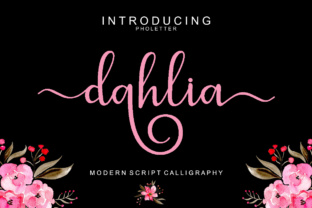
Dahlia Script is a digital font that emulates the fluid strokes of a calligraphy pen. Its letterforms are designed to appear as though they were written by hand, yet the character set is carefully crafted for consistency across both uppercase and lowercase letters. The font features sweeping ascenders, graceful descenders, and a moderate amount of contrast between thick and thin strokes. Unlike some script fonts that aim for a rigid, formal look, Dahlia Script leans into a more contemporary style—think of a modern calligrapher’s work rather than traditional copperplate scripts.
The typeface includes standard ligatures, alternative glyphs, and international support, which makes it versatile for projects that require a polished handwritten appearance. Its name evokes the dahlia flower, suggesting a combination of natural beauty and structured form.
Why Someone Might Be Interested in Dahlia Script
Several features of Dahlia Script appeal to designers and hobbyists alike. First, its handwritten quality can infuse a project with warmth and personality. Logos, quote graphics, or product labels often benefit from a human touch that sans-serif or serif fonts cannot provide. Second, the modern calligraphy style fits well with current design trends that favor authenticity and handmade aesthetics. Third, the font’s readability—for a script—is reasonably high, thanks to clear letter shapes and consistent spacing.
Additionally, Dahlia Script offers stylistic alternates and swashes, allowing users to customize the look without needing advanced software skills. This flexibility is attractive for someone who wants a unique result without commissioning a custom typeface.
Benefits of Using Dahlia Script
- Aesthetic appeal: The font adds an elegant, fluid quality to any design. It works particularly well when you want to convey sophistication or creativity.
- Versatility: Dahlia Script can be used across print and digital media, from wedding invites and greeting cards to social media graphics and website headers.
- Ease of use: Installation and application are straightforward. The font includes OpenType features that can be accessed in most design software.
- Personality: Because it mimics real handwriting, Dahlia Script can make a brand feel more personable and approachable.
Tradeoffs and Considerations
No font is perfect for every context. Dahlia Script has several limitations that are important to weigh before committing to it for a project.
Legibility at Small Sizes
Like most script fonts, Dahlia Script can become difficult to read when scaled down. Body text set at 12 points or smaller may lead to cramped or unclear letterforms, especially on low-resolution screens. If you need a font for long paragraphs or small mobile displays, this script is likely not the best choice.
Kerning and Spacing
While the default letter spacing is reasonable, some specific character combinations may require manual kerning adjustments. For example, consecutive connectors like "ff" or "ll" can occasionally appear uneven. Designers who are not comfortable adjusting kerning may find occasional inconsistencies that detract from a polished look.
Lack of Extensive Glyph Variations
Although Dahlia Script includes alternates and swashes, the range is not as extensive as some premium calligraphy fonts that offer dozens of variations per letter. For projects that demand extreme customization—such as a full monogram set—you might need to supplement Dahlia Script with other typographic elements.
Formality Spectrum
The font occupies a middle ground: it is not as casual as a brush script nor as formal as a classic copperplate. This can be a strength in many contexts, but if your project requires a very strict formal tone (e.g., legal documents or classical certificates), Dahlia Script may feel too modern. Conversely, if you need a distressed or rough handwritten look, this font’s clean edges might be too polished.
Where Dahlia Script Excels
Despite its tradeoffs, Dahlia Script shines in scenarios where a modern, elegant handwritten feel is the primary goal.
- Event stationery: Wedding invitations, save-the-dates, and party announcements benefit from the font’s romantic yet contemporary vibe.
- Branding for lifestyle businesses: Bakeries, florists, jewelry makers, and beauty brands often use scripts like Dahlia Script to communicate artisanal quality.
- Quotes and social media graphics: The font stands out on platforms like Instagram or Pinterest, where visual appeal is critical and text is often short.
- Logos and wordmarks: When used with care, Dahlia Script can form the centerpiece of a logo while remaining distinct and readable.
- Product packaging: Small-batch products, especially those with a handcrafted angle, can use this font to reinforce authenticity.
When Alternatives Are Worth Considering
No typeface is a one-size-fits-all solution. You may want to explore other options if any of the following conditions apply.
- Need for extreme legibility: If your project requires body text or dense information, consider a clean sans-serif or a highly legible serif font. Scripts are rarely ideal for large blocks of copy.
- Requirement for a distressed or grunge look: Dahlia Script is smooth and refined. For a rough, hand-drawn effect, look at brush scripts or marker-style fonts.
- Budget constraints: Dahlia Script is usually offered at a moderate price (often around $15–$30). Free alternatives like Alex Brush or Pacifico provide similar aesthetics but with different character sets and licensing.
- Need for extensive language support: While Dahlia Script covers many Latin-based languages, it may not include accented characters for all European languages or non-Latin scripts. Check the glyph coverage before globalizing a design.
- Project requires a very formal or traditional calligraphy style: For certificates, formal invitations, or heraldic designs, traditional copperplate or Spencerian scripts may be more appropriate.
Practical Decision-Making Insights
To determine whether Dahlia Script fits your needs, ask yourself a few targeted questions.
- What is the primary medium? For print projects with short text, Dahlia Script works wonderfully. For digital use, test the font at the intended screen sizes to ensure clarity.
- How much control do you have over typography? If you can adjust kerning and access OpenType features, you will get more out of this font. If you are using a platform with limited typographic control, simpler scripts might be easier.
- What impression must the design convey? Dahlia Script gives a modern, elegant, and friendly feel. If your brand voice is edgy, minimalist, or ultra-formal, the font may clash.
- Are you pairing it with other typefaces? Scripts often pair best with neutral sans-serifs (like Montserrat or Lato). Test combinations to ensure harmony in weight and style.
- What is the longevity of the design? Trends change. A very trendy script might date quickly. Dahlia Script’s style is currently popular but not overly trendy, so it may age reasonably well.
Testing Before Committing
Most font retailers offer trial downloads or preview tools. Create a mock-up of your actual project—a logo draft, a social media post, or a product label—and evaluate how Dahlia Script performs. Pay attention to:
- Readability at the intended size
- Overall visual balance
- How it interacts with other design elements (graphics, backgrounds, other fonts)
- Whether the alternates and swashes enhance or complicate the layout
A quick test can save hours of rework later. This step is especially critical if you are using the font for branding, where consistency matters across all touchpoints.
Conclusion
Dahlia Script is a well-executed modern handwritten calligraphy font that offers a blend of elegance and contemporary style. It is particularly suited for short-form applications where a personal, artisanal touch is desired. However, like any tool, it has limitations—chiefly in legibility at small sizes and in contexts requiring extreme formality or customization.
By carefully considering your project’s medium, message, and constraints, you can determine whether Dahlia Script will support your vision or whether an alternative typeface might serve you better. The key is to evaluate the font as one element in a broader design system, not as a standalone solution. With thoughtful application, Dahlia Script can elevate your work—but it works best when chosen for the right reasons.